Just the facts, ma'am: A Practical Guide to Agentic Engineering Part 3

Resource Management For Dummies
NOTE: This is Part 3 of a 3 (?) part series on my education with AI-driven software development. Part 1 is the why. Part 2 is the how. Here we finally come to the specific whats. Footnotes are clickable. I feel obligated to add: this was written by a human, for other humans. If your instinct is to ask an AI model to summarize this post, it is not for you.
Everything here talks about Claude, because Claude and I are 🤝. And unlike Parts 1 & 2, I can't guarantee it'll work just as well with Codex or Cursor. At time of writing, I can unequivocally say "Just Use Claude". That might be different 1 month from now.
Markdown Is Turing Complete now?
The first time I saw an agent “implementation”, I didn’t know whether to laugh or cry. It was when I was looking through the AI-re-implemented codebase of a major AWS service, and I came across their ops agent persona. This is the agent that was supposed to run whenever a ticket came in to investigate metrics, logs, attempt to root cause, and provide some helpful context to the paged operator by the time they came online. Bots like this are common across AWS teams, but this one was defined in sentences in a markdown file. Some sentences said MUST in bold capitals. “I hate this”, I thought. “There is no way that can work.”
Reader, it works.
With the rise of package repositories full of markdown files that define agent skills and behaviours, there’s a refrain amongst AI-suspicious technologists - “We’re installing markdown files as dependencies now? Are y’all taking crazy pills?”
Yes, and they're yummy.
Call Me Ms. Pac-man, I guess
We are now firmly in the “show, don’t tell” portion of this series, and a lot of what I have to show are markdown files.
Context: These are lessons from my first 5 weeks working on a Python security platform for Safety Cybersecurity, using Claude Code. Your stack will be different, as will your tools. But the patterns from the workflow to the feedback loops to the failure modes will transfer. Because I wasn’t vibe-coding a demo on a weekend, this is my setup after a 30,000+1 LOC feature from my first 2 months at a new job. All of this code was reviewed by me, and then another human reviewer, because I am still new to the domain.
Me and My Claude(.md)
Typical (short & medium) session
I'm going to describe my usual cycle that happens a dozen times in a day. Then I'm going to explain all the pieces to getting it, because it doesn't come like this out of the box with the tool.
I open claude the usual way. On startup, it reads my personal instructions, repo-specific instructions, it's lessons memory, and any pending tasks from the last session. I pick a model - always Opus, always 4.latest, always High effort, almost always not the 1M context. I want the best thinking, but I found the larger context doesn't make it smarter, it just means you can have longer sessions.
I tell Claude about my troubles. If I know exactly what I want it to do, and the approximate effort and token cost (practice), I just tell Claude to "do it". If I have some uncertainties, and want to review/iterate on the proposal, I immediately go into plan mode. This is the p90 case. Sometimes I explicitly tell it to research using sub-agents, but I like visible chain of thought, so I usually I keep my context down in other ways. If the plan looks good, and I've used <30% of the context window, I just tell it to proceed. If >50%, I clear first. If changes to the plan are needed, we discuss and iterate, and I keep an eye on that budget. Once you get up to ~60%, claude cognitive decline starts to be felt, so I clear and restart from scratch with the latest plan file. On some plans that might happen a few times. Once I'm happy with the plan, I clear the context and ask claude to do an adversarial of the plan. We debate, make changes, clear and re-review. That might happen once, or up to five times. If the model ever flip flops on a decision, I think deeper and step in with justified reasoning to add to the plan. One more clear, and start implementing, auto-accepting changes. I go for coffee (😭 - yeah right - I go to another claude session in another workspace).
Once the plan is implemented, claude automatically runs my configured linters, static checkers, tests, commits in the style I prefer, and starts an code review agent with a clean context. The review agent returns its findings, and the main agent evaluates the findings, and creates tasks for the ones it agrees with. Then it stops and asks me what to do. I review the code in the commit, I weigh in on the issues found by the review agent, I tell it to close some, or create new ones. Then I tell it to work on the tasks. At the end of those, it'll launch another round of checks & tests, and another review sub-agent. Once the session is finished, claude automatically logs lessons for itself, updates relevant in-repo documentation or design docs, and captures new improvements to it's skills.
You'll notice in the last paragraph I didn't say "clear context" once. That doesn't mean I don't do it, it means it happens all the time, so long as our state is backed up somewhere: Git commit, task files. At any point once context gets too big, I can safely clear, and continue from the same place.
Atypical (long) session
If the plan turns out to be particularly long, or I knew from the start that I'm working on a "feature" that'll span multiple repos or multiple major sets of changes, I plan with specs. That just means that every planning step is a little more rigorous. Instead of a prompt, I have a proposal. Maybe even a document. Instead of a plan, claude provides a design document, a list of specs (basically user stories), and a detailed task list. (We'll talk more about all this below)
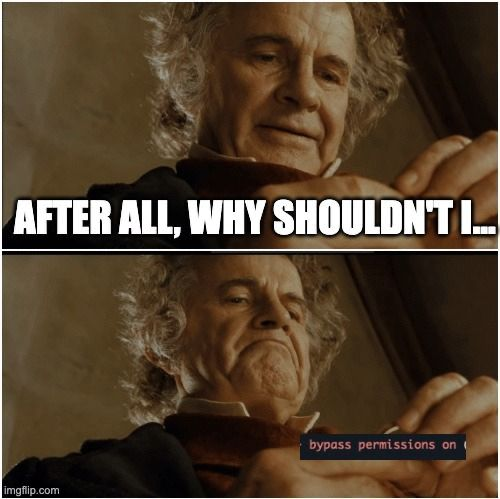
Once I have this, I open claude the unusual way: tmux -CC new-session claude --dangerously-skip-permissions . I didn't start out like this but if I'm writing code in a repo I know with predictable requirements, dangerously-skip-permissions is really not that big a deal...
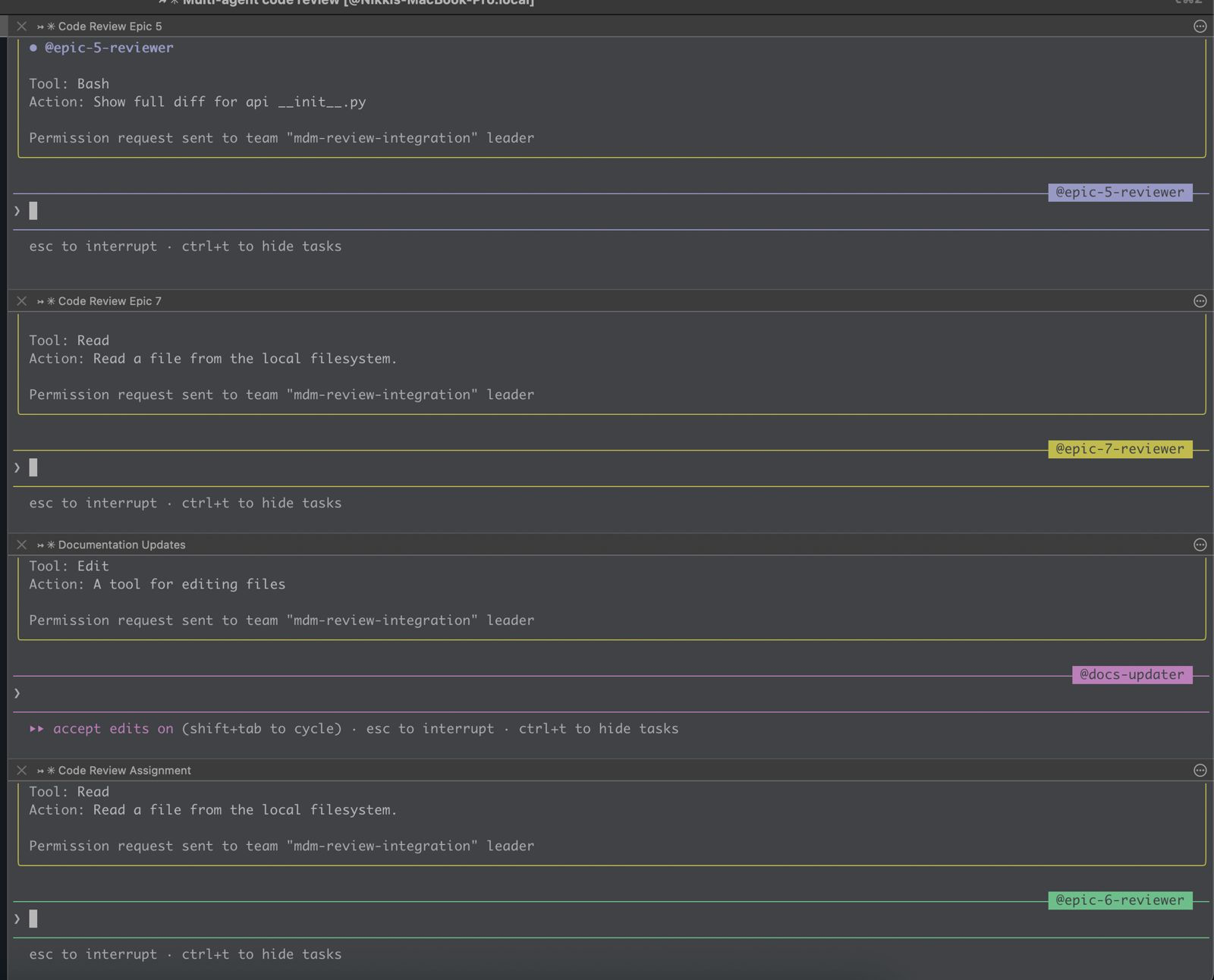
The tmux mode is for agent teams. This is because for a long multi step plan with lots of tasks, I tell claude to create teams of sub-agents to parallelize work, put the lead in "delegate mode", and step back. The lead agent in delegate mode will consume hardly any context, and orchestrate stepping through the task list in much the way I described in the earlier session. I usually give it a subset of the spec to work on - an epic for instance. So I still will do my own review, and send a pull request to another human (for now...).
Context: Your Most Precious Resource
The core discipline is: output state, then clear context. An agent generates artifacts (plan, spec, tasks, analysis, code, code-review), outputs its findings to something durable on disk, and dies (or you kill it). The next agent picks up the file, and keeps going.
The artifacts that persist between these short-lived agents are what I called "stepping stones" in Part 2. Here are all the relevant ones for me, and I will explore what is in each of them.
~/.claude/CLAUDE.md- Global preferences and workflows. Applies to every project. This is what I want Claude to know about me and how I work.- Project
AGENTS.md(orCLAUDE.mdat repo root) - Project-specific rules, context, design decisions, preferences. - Project codebase map. Claude
/initpopulates the above markdown with useful findings in the code, but I like to run cartographer occasionally and get a deeper look at the code. This is your RAG replacement. You don't want claude to load in your entire repo every run unless you are militant about tiny repos, but you also don't want it to rely purely on dumb old school tools likegrep, lest it make incomplete decisions. - Skills - Knowledge - Domain-specific rules on
Foo, loaded on-demand only when Claude is working onFoo. Can be global or per-repo. - Commands - Imperative workflows invoked with
/command. Can be invoked by you, or by Claude, based on the rules in the earlier ones. Can be global or per-repo. - Plan files or specs
lessons.md- live-updating set of insights claude keeps track of- tasks - active work issues
- plugins and MCPs - I use these interchangeably because both are for making industry tools and services easier to use, from Playwright to Sentry to Figma to GitHub.
The last bullet is the first place to get stingy. I have a lot of plugins installed. I keep most of them disabled until I know I need them. This isn't because the disabled ones are bad - context7 is useful for library docs, figma for design work, linear for issue management. But each enabled plugin consumes context in every session, whether I need it or not. The decision framework: "Do I need this tool in most sessions, or just some?" If the answer is "just some," enable it per-session rather than globally. Save the permanent context budget for things you genuinely use every time2.
Bootstrap
I know, you're already overwhelmed. But remember, this isn't just another software tool and you're not learning something fixed like a list of new keyboard shortcuts. You don’t have to reinvent your setup of all of the above from scratch, building up from Hello World. Of course I already mentioned /init and cartographer, but that's baby stuff. Feeling bold?
Try this one. The idea is simple: point Claude at an example repository that already has a mature Claude Code configuration, tell it to explore the patterns, then bring them back to your codebase. But here’s the part that elevates it from “copy someone’s config” to something genuinely useful: you also ask Claude to build a testing framework for evaluating whether each change actually improves outcomes. Run a sample prompt before the change, take notes, apply the change, run the same prompt again, compare. Repeat for each recommendation.
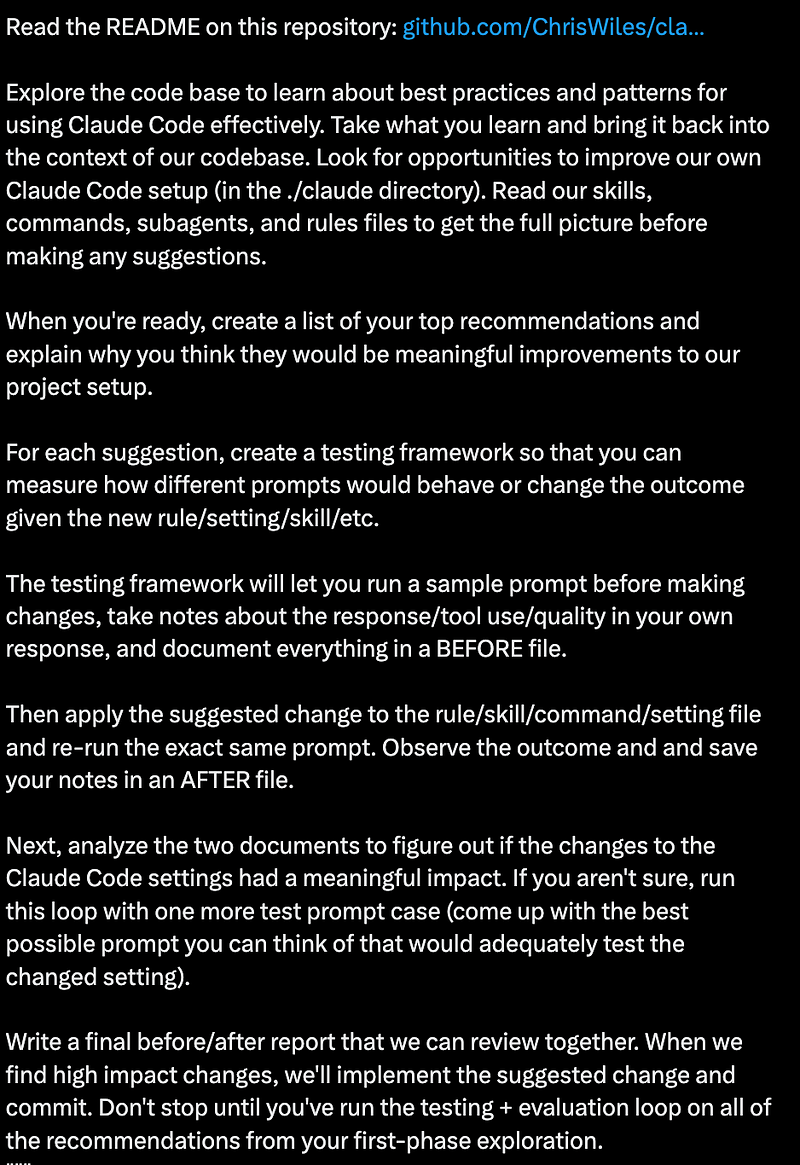
I used this approach to bootstrap my first repo at Safety, and then after 2–3 weeks of iteration and improvement to the skills there, I used that repo to bootstrap the next ones. Claude can read an existing .claude/ directory, understand what the skills and commands do, evaluate which ones apply to a different project, and adapt them - with the same eval harness to check its own work. It’s turtles all the way down.
The lesson isn’t “use this specific prompt.” It’s that the tools are is remarkably good at configuring themselves. Once you have one repo with a solid setup, every future repo gets cheaper to bootstrap. And you don’t need to understand every part before you begin - because the configuration can come with its own testing and teaching loop. But let's talk about all the parts anyway.
The Foundation: Who You Are
While repo-specific insights are great, your biggest productivity gains will come from your personal global CLAUDE.md.
What's in mine? Besides the subjective boring stuff of how I want Claude to work, how often to commit, run tests, commit message formats, and task management? Here are some important examples:
## Python Learning

I'm new to Python. When working with Python code:
- Explain Python-specific idioms and conventions (e.g. ...)
- Point out common pitfalls for beginners
- Explain any "magic" when encountered
- Clarify advanced patterns when used
- Note when something is "Pythonic" vs a more verbose alternative

## Security and vulnerability domain Learning

I'm also new to the Security and Vulnerability domain. When encountering domain terms or acronyms
- Define them, and what they mean.
- Bring up considerations that may be obvious to security engineers or researchers working in the domain of vulnerabilities, advisories, etc, but may not be clear to a random software engineer

## Claude learning

I'm new to Claude Code. You should occasionally prompt me with ideas or questions about how I can use Claude Code more effectively
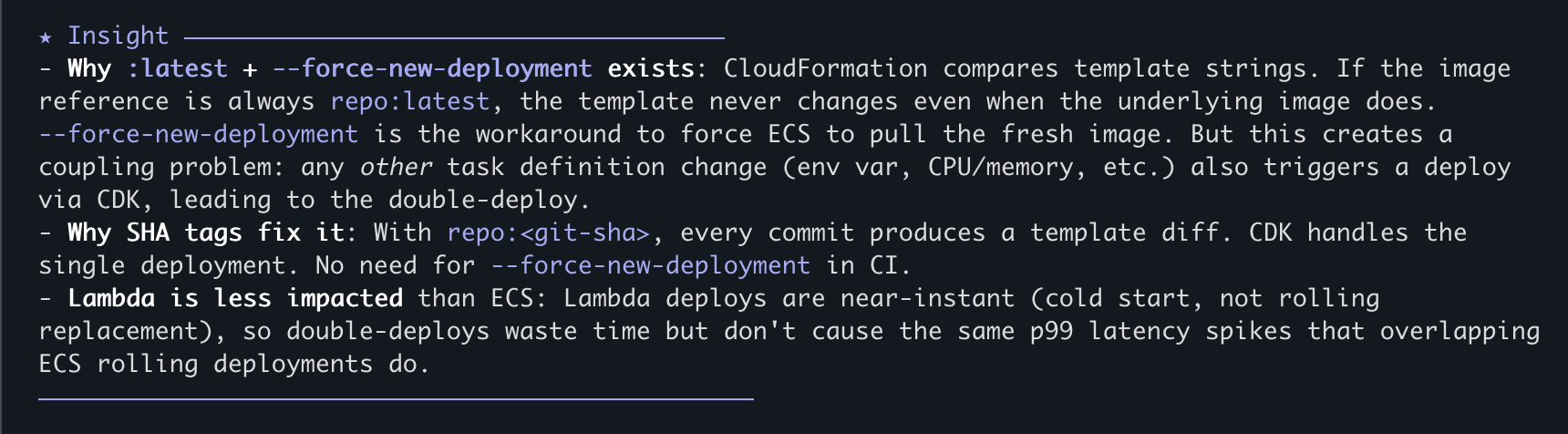
Right away, gotta lead with humility. These are the first things I added based on what I felt I need more help with learning3, but writing this guide makes me realize it's time to remove the 3rd section. In Claude this results in stuff like this:
Here's another section that proves useful multiple times a to remind me to Trust but Verify:
At the end of any plans, or code changes, you should remind me to ask you to be adverserial with your ownresponses, and ask me to ask you to review your own work so that I don't get too trustingSometimes this just makes Claude say "Reminder: verify my work". Sometimes it's borderline hilarious with like: "You should be adversarial with my proposal. For example <insert description of fundamental problem that is definitely already in the plan>."
Here's a funny one. Claude is good at using MCPs and tools, but it's not good at admitting it's blocked (actually its persistence to not giving up is probably its best feature). That means if it can't access a github issue because its private and it forgot it has the gh cli, it will try to figure out what it might say. If it can't access your figma mocks because the figma MCP wants daily authentication (seriously, WTF Figma...), it will try to design something for you.
If my prompt has a figma link, use figma MCP.
If my prompt has a github link, use GH CLI.
If my prompt has a sentry link, use sentry MCP and CLI.
If my prompt has a linear link, use linear MCP.
If you're in a repo that uses shadcn, use shadcn MCP.
If I tell you to call aws, use the aws cli with the default profile and us-east-2
**IF ANY OF THESE MCPS ARE UNAUTHENTICATED OR CLIS NOT PRESENT, DO NOT WORK AROUND THAT - FAIL QUICKLY AND TELL ME WHAT'S WRONG**
I'll talk about specific task management, implementation and review workflows, shortly, but here is the spine of the file (I'm sorry, I forget who I stole this from, but you should steal it from me) that is relevant to basically every task:
### 1. Plan Mode Default
- Enter plan mode for ANY non-trivial task (3+ steps or architectural decisions)
- If something goes sideways, STOP and re-plan immediately - don't keep pushing
- Use plan mode for verification steps, not just building
- Write detailed specs upfront to reduce ambiguity

### 2. Subagent Strategy to keep main context window clean
- Offload research, exploration, and parallel analysis to subagents
- One task per subagent for focused execution
- Make sure to OUTPUT the Code Review issues found by the sub-agent in the main context window - this is both for human auditing, and for future iterations to ensure you're not toggling.
- Subagents inherit the parent model by default. To guarantee model choice, always set the `model` parameter explicitly on subagents
- **Always use `model: "opus"` for Plan subagents** — planning quality matters more than speed

### 3. Self-Improvement Loop
- After ANY correction from the user: update '~/.claude/tasks/lessons.md' with the pattern
- Write rules for yourself that prevent the same mistake
- Ruthlessly iterate on these lessons until mistake rate drops
- Review lessons at session start for relevant project
- If it makes sense to, and it's a generic lesson, add it to this CLAUDE.md
- If it makes sense to, and is project-specific, add it to the AGENTs.md of the active project
- If it makes sense to, and there are related project skills, expand/augment the project skill.

### 4. Verification Before Done
- Writing unit tests is part of the implementation work. Tests need to be thorough, but not redundant, and never verify something they mocked.
- Unit tests are necessary, with the appropriate mocking. But Integration tests that verify the broader system state are also important.
- Never mark a task complete without proving it works
- Diff behavior between main and your changes when relevant
- Ask yourself: "Would a staff engineer approve this?"
- Run `/review-changes` before committing (lint, format, type check on changed files)
- **NEVER dismiss tool errors as "pre-existing"** — two levels, BOTH mandatory:
  - **File-level**: if lint/format/type-check fails on files you edit, fix it.
  - **Branch-level**: if the full test suite fails on your branch, investigate and fix. CI gates the branch, not individual files. "I didn't touch that file" is NOT a valid reason to ignore failures. Always ask: "Is this failure caused by code on this branch?" If yes, own it.
- Run tests, check logs, demonstrate correctness
- During integration work (cherry-picks, rebases), run `/review-changes` + tests after each step — issues compound when deferred
- Update tasks.md if there is one associated with the working spec
- If a code review agent finds a bug, evaluate why did the unit/integration tests not catch it. Was coverage insufficient? Did the tests have a bug? Or was the bug in the spec?

### 5. Demand Elegance (Balanced)
- For non-trivial changes: pause and ask "is there a more elegant way?"
- If a fix feels hacky: "Knowing everything I know now, implement the elegant solution"
- Skip this for simple, obvious fixes - don't over-engineer
- Challenge your own work before presenting it

### 6. Autonomous Bug Fixing
- When given a bug report: just fix it. Don't ask for hand-holding
- Point at logs, errors, failing tests -> then resolve them
- Zero context switching required from the user
- Go fix failing CI tests without being told how

## Core Principles
- **Simplicity First**: Make every change as simple as possible. Impact minimal code.
- **No Laziness**: Find root causes. No temporary fixes. Senior developer standards.
- **Minimal Impact**: Changes should only touch what's necessary. Avoid introducing bugs.
I know. I feel silly re-reading it myself. There's a whole meme marketplace out there for "**MAKE NO MISTAKES**". But it works 💀.
That "NEVER dismiss tool errors as pre-existing" rule? It's there because Claude will absolutely try to do this. It'll introduce a bug, notice a test fails, and then say "this appears to be a pre-existing issue" with a straight face. The first time it happened I was annoyed. The second time — weeks later, after I thought I'd fixed it with a lesson entry — it found a loophole. The full test suite had 4 failures on my feature branch, and Claude dismissed them because the failing test file wasn't one it had directly edited. Technically true! The tests were failing because of changes elsewhere on the branch. The CI doesn't care which file you edited; it gates the branch. So now the rule has two explicit levels, both mandatory. This is how the instruction files evolve: through failure, not foresight. Every rule in my setup exists because something went wrong without it.
Project-level AGENTS.md files is where the real density lives. Excerpt:
### Common Footguns - MUST Know
1. **"Show once" token pattern**: When generating secrets/tokens that are shown once,
   NEVER assign to `_var` (Python convention for unused variables). Always explicitly
   return the raw value.
2. **Trailing slash auth bypass**: FastAPI's default 307 redirect from `/path/` to
   `/path` strips the request body on POST and can bypass auth checks.
3. **Basic auth colon splitting**: When parsing `Authorization: Basic base64(key:value)`
   where the key or value can contain colons (e.g., MAC addresses `00:11:22:33:44:55`),
   use `rsplit(":", 1)` to split on the LAST colon.
These instruction files aren't just for Claude. They're documentation that benefits every human who touches the repo. The trailing-slash auth bypass is something a new hire needs to know regardless of whether they use AI tooling. The "show once" token pattern is a legitimate security concern. By encoding these as agent instructions, you also accidentally create the best evolving documentation from the intersection of broad agentic knowledge and deep human judgement. It's literally the meme:
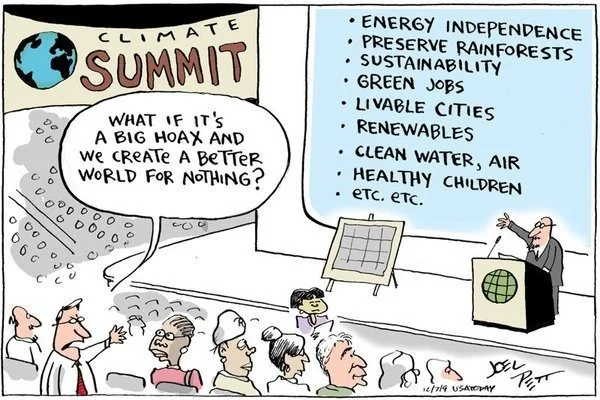
This is no coincidence. The things an AI agent needs to be told explicitly are often the same things that live in tribal knowledge — the stuff that senior engineers know but nobody ever writes down because "everyone just knows." Turns out, agentic workflows like this force you to write it down. And then everyone benefits.
We've been telling developers to write documentation for 30 years and they haven't yet. What makes this different? The short answer: agent instruction files actually get read4.
Skills and Commands
Skills are knowledge. They're markdown files that get loaded when Claude detects it needs them (based on trigger descriptions you write). Here are some I created from a mixture of that Bootstrap from above, DIY, and the /capture-skills command: fastapi-patterns, testing-patterns, sqlmodel-conventions, security-domain. When I say "create an endpoint," Claude loads the fastapi-patterns skill and knows that auth: AuthRequired is always the first parameter, that the router variable is named api not router, that trailing slashes cause auth bypasses, and that the DTO pattern uses separate Pydantic models in dtos.py. Skills are passive — they inform decisions but don't prescribe actions. You never directly tell Claude to use them, and they help keep your AGENTS.md better organized, and gives your context more space.
Commands are workflows. They're step-by-step instructions invoked with /command. Either by you, as part of a prompt. Or by Claude, as part of it's workflow instructions. Here are some of mine:
| Command | What It Does |
|---|---|
/review-changes | Runs lint, format, typecheck on changed files; discovers and runs related tests |
/pr-prep | Full quality check + PR summary generation |
/test-feature | Identifies what to test, finds patterns, creates test file, runs tests |
/db-migration | Edits models → generates Alembic migration → applies → verifies |
/capture-skills | Reads the session, captures lessons into existing or new skills |
And yes, these commands, despite taking parameters, and having logic, are written in english, in Markdown 🤷♀️. The one that gets the most use is /review-changes, which Claude loves, and I do too for my own changes. Some excerpts:
# Review Changes Command

Run quality checks on only the files that have changed (staged + unstaged), mirroring what CI checks on PRs.

## Checks Performed

1. **Format** — `uv run ruff format --check`
2. **Lint** — `uv run ruff check`
3. **Type check** — `uv run pyright`
4. **Related tests** — discover and run tests for changed files (unless `--no-tests`)

## Workflow

1. **Identify changed files**:
   ```bash
   git diff --name-only HEAD
   git diff --name-only --cached
   ```
   Filter to `.py` files that still exist on disk. Deduplicate.

2. **Run targeted checks** (on changed files only):
   ```bash
   # Format check (no auto-fix, just report)
   uv run ruff format --check <changed_py_files>

   # Lint check
   uv run ruff check <changed_py_files>

   # Type check
   uv run pyright <changed_py_files>
   ```

3. **Discover and run related tests** (default behavior):
   See Related Test Discovery below. Skip with `--no-tests`.

4. **Report results**:
   - List files checked
   - Show any issues found per category (format, lint, types, tests)
   - Suggest fixes for any failures

## Rules

- **You own every error on files you touch.** Never dismiss lint/type errors as pre-existing — if your changes touch a file, that file must be clean before you commit.
- **You own the branch, not just individual files.** If the full test suite fails on your branch, investigate and fix. CI gates the branch, not individual files. "I didn't touch that file" is NOT a valid reason to ignore failures. Always ask: "Is this failure caused by code on this branch?" If yes, own it.
- **Do not commit or mark work as done without passing these checks.** If checks fail, fix the issues before proceeding.

## Arguments

`$ARGUMENTS` - Optional flags:
- `--fix` - Auto-fix formatting and lint issues before checking
- `--staged` - Check only staged files (skip unstaged)
- `--no-tests` - Skip test discovery and execution
- `--all-tests` - Run the full test suite instead of only related tests
...
Then there's /capture-skills, which is just so meta, and was introduced to me by Alex 🫶. Its job is to look at the current session and extract lessons. It runs at the end of every session and asks: Were there confusing patterns? Novel solutions? User corrections? Did the agent have to be told the same thing twice? Did an agent figure something but it took way too many tokens in the wrong direction? It then routes each learning to the right destination: an existing skill update, a new skill, an AGENTS.md entry, or a lessons.md one.
We're not going to talk about Hooks5.
Planning with OpenSpec
First, a reminder: plan everything, not just the big features. Have the agent investigate the current state, form a plan, and then implement in a fresh context with only the plan and the relevant files. The research phase fills context with exploration and dead ends; you don't want that baggage during implementation. A clean implementation agent with a crisp plan will outperform a single agent that researched and implemented in the same breath every time. This is the simplest form of context discipline, and it applies daily. And Claude's Plan Mode is very good, and good enough most of the time.
For non-trivial features, anything touching multiple concerns, repos, requiring architectural decisions, you want something more structured. You also want an artifact to leave not just for your reviewers, but for the next set of coders - human and agentic alike. I use OpenSpec, and I'm very happy with it. It gives you a structured change proposal workflow: from proposal (what and why), to design (architectural decisions), to a formal spec (requirements with WHEN/THEN scenarios), to a task breakdown (phased implementation checkboxes, grouped by epics). All in markdown, all version-controlled, all before you write a single line of implementation code. The framework isn't doing anything magical, it's basically Prompt Engineering in a Box, but designed to help keep an agent on track and focus on each milestone/stepping stone. It also makes edits easier without a giant cascade. The artifacts can be reviewed in a human design review meeting while your agent is literally already coding on the tasks. Whatever decisions get changed in the review can propagate through the file changes, and the agent can refactor in place.
Subjectively, I believe it's a good idea to check each of these files with your code, but then remove the tasks after you're done. I haven't done this yet, but I think I will create skills that reference existing affected specs so that future code evolution can also update the specs for the feature so they can be a useful snapshot of system behaviour for humans and agents alike, and ensure no regressions.
This is the process I followed for my first major feature at Safety - a Mobile Device Management (MDM) system — adding enrollment and machine-to-machine auth to a platform that previously only supported OAuth user authentication. It touched 10 new API endpoints, multiple database tables, two token formats, enrollment key lifecycle management, and a composable auth policy system. And that's just the backend, on the frontend there was an admin portal for management of keys, machines, system scans and users, and of course the actual safety-cli changes for the end clients.
Iterating on the spec took 7 days and 37 commits. That's a totally reasonable length of time for a design of this scope, with or without AI. It's the next part where the efficiency gains appear. The commit messages from that period read like a conversation:
- "PROMPT: Let's add a decision for how we will model system_id"
- "PROMPT: Do a thorough review... What are we missing"
- "PROMPT: We need an explicit design for the token format"
- "PROMPT: Let's do an adversarial security review"
That last one is important. After the design was "done," I asked Claude to put on a different hat and attack its own work. The resulting security_review.md found 3 high-severity, 3 medium-severity, and 4 low-severity findings — from the same AI that wrote the design. With a clean context window and explicit instructions to be adversarial, it could see problems it was blind to during the creative phase. I liked that so much, I then asked it to do a thorough database review, and it found more issues, some to fix now, and some latent ones for the backlog. In the end, the spec contained 55+ stories, broken down into 18 task phases with 150+ checkboxes.
I can hear you: "That's just waterfall in markdown." But remember the feedback loop. This is all still within the time range of a standard sprint. The actual implementation was done in several hours. I wanted to see how Claude could do with just the workflow I designed, and no intervention. Then, I parked the code on a branch (to compare later), and went back epic-by-epic. This time reviewing the changes myself for each epic, before I sent for reviews to a peer6. That took more than a week, because I also made some dumb mistakes, being new to the codebase7. With this more iterative approach, some requirements evolved, and we were able to attain better quality, maintain cognitive awareness of the changes, and have operational ownership of the end result. This is the sweet spot.
Is this level of specification overkill for a CRUD endpoint? Absolutely. For a security-critical authentication system touching 10 API endpoints? I'll take the 7 days of spec iteration over the alternative timeline where we shipped without one. But this was also a change that involved authN/Z, and my first one at the company. My next change? One without similar novel security implementation concerns? I'll go further without intervention.
The Review Loop: Trust, Verify, Memorize
A subtlety everyone learns the hard way: how you frame the review prompt matters as much as who does the reviewing. Even with a fresh-context review subagent, if you tell it "find bugs in this code", it will find some — even if it has to invent them. The models are sycophantic by design; they want to deliver what you asked for. A neutral prompt works better: "Review and evaluate the code in the last commit against the spec and report findings." Sometimes this surfaces real bugs. Sometimes it matter-of-factly confirms the code is correct. But it doesn't bias the agent into manufacturing problems to please you, which means the bugs it does report are more likely to be real. Asking a separate agent to re-review the findings usually weeds out the false positives. But sometimes a re-re-review is needed8.
I said in Part 2 that hallucinations are basically dead, so long as you practice good context discipline. That wasn't exactly true. Hallucinations aren't dead, they just get mythbusted during the implementation phase. Claude can hallucinate whatever API it wants, but it's good enough at testing that it will usually figure out problems by itself, and fix them. That leaves some tricky edge cases.
During one of my implementation runs, Claude used ctx.protected_params to get the current Click command path. The attribute protected_params does not exist in Click's Context object. Click has protected_args. Claude had hallucinated an API name. It also confidently defended it when my PR reviewer pointed out it doesn't exist, and I told Claude. This is an egregious hallucination mostly because it was the first and only time that happened, and the reason it was so insidious and passed tests is that it was called via dynamic resolution, so for tests, Claude just mocked it. This is now immortalized in my lessons.md:
## Dynamic resolution hides hallucinated APIs — verify names before bypassing static checks
. Dynamic resolution patterns (`getattr` with defaults, `hasattr`, `dict.get` on untyped dicts, reflection, etc.) bypass static analysis and silently succeed when the target doesn't exist. When using these, independently verify that the attribute/key name is correct — you've opted out of the safety net.
2. If a test requires `# type: ignore[attr-defined]` to set up state, that's the type checker saying the attribute doesn't exist in production. Investigate, don't suppress.
3. Prefer direct attribute access when possible — let type checkers and runtime errors catch wrong names for you.
**Applies to**: All projects — Python (`getattr`, `hasattr`), JS/TS (bracket access, optional chaining on unknown shapes), etc.
Which brings us to the third piece of the review loop: memorizing. Every time a review catches something — or worse, every time I catch it after a review missed it — it goes into lessons.md. Each lesson has a trigger (what went wrong), a rule (how to prevent it), and an "applies to" scope. Each one represents a mistake that will not happen again in this codebase, because the rule is loaded into Claude's context at the start of every session. Claude is doing this all by itself, but I also force it by running /capture-skills myself at the end of sessions.
Landing the Plane
The end of sessions is configured like this:
## Landing the Plane (Session Completion)

**When ending a work session**, you MUST complete ALL steps below.

**MANDATORY WORKFLOW:**

1. **Run `/capture-skills`** - Review session for learnings before closing out
2. **Create tasks for remaining work** - Use `TaskCreate` for anything that needs follow-up (these persist on disk at `~/.claude/tasks/` and can be picked up by the next session)
3. **Run quality gates** (if code changed) - Tests, linters, builds
4. **Update task status** - `TaskUpdate(completed)` for finished work, ensure in-progress items have clear descriptions for next session
5. Remind me to amend the commit and push it myself
6. **Clean up** - Clear stashes, prune remote branches
7. **Verify** - All changes committed (SKIP GPG) **but not pushed**
8. **Hand off** - Provide context for next session
9. **Sync permissions** - Check if any new tool permissions were approved during this session by reading the project's `.claude/settings.local.json`. If there are entries NOT already in `~/.claude/settings.local.json`, ask the user: "I noticed new tool permissions were approved this session. Want me to add these to your global settings so they apply in all repos?" Then merge them if approved.
The repo's that I've onboarded to these best practices have a similar section for their AGENTS.md This ensures that any other engineers who don't have my CLAUDE.md also benefit when they use Claude in this repo, but it's subject to the availability of the specific tools and stepping stones.
1. **Run `/capture-skills`** - Review session for learnings before closing out
2. **Run `/review-changes`** (if code changed) - Run before every commit, not just at session end. Lint, format, and test changed files. Do not commit without passing.
3. **File issues for remaining work** - Track anything that needs follow-up
4. **Update docs/CODEBASE_MAP.md** - if anything in the codebase map for agents was changed in this session, update it (and bump the timestamp)
5. **Update docs/db_model.md** - if there were any changes to any data model objects referenced, update it.
6. **Update issue/task status** - Close finished work, update in-progress items/tasks
7. **Clean up** - Clear stashes, prune remote branches
8. **Verify** - All changes committed
9. **Hand off** - Provide context for next session
These ensures that everything we described in this guide so far gets cleaned up.
I still haven't told you about tasks, but...

Sorry, there's going to be a Part 4 after all. Part 4 we are going to cover Tasks, PR workflows, and Figma UI development. We'll finish with my plans for further evolving my environment for improved determinism, and a summary of everything that I think Claude Code is currently still bad at.
Ultimately, Part 4 is about when you just have to do a little bit more yourself.
Footnotes
(tip: click on footnote to go back to where you were reading)
1 You do not need to get in the comments and tell me that LOC is a useless measure of productivity. I spent years in performance reviews explaining that point to managers. However, it is also a proxy and you'll just have to trust me that in this case it's a proxy for "medium-to-large sized feature across 3 services and 2 clients".
2 The same philosophy extends to permissions. I don't talk about it here because I have a strong hunch Claude Code is going to make this way easier soon. But my settings.json has 200+ individually approved command patterns. Not Bash(*) — that would let Claude run anything. Each git subcommand, each gh operation, each uv run variant, each aws CLI call is individually approved. This is tedious to set up (you'll be clicking "approve" a lot in your first week), but it creates an explicit record of what your agent can and cannot do. And honestly, after the first week, the approvals slow to a trickle. Most of what you use day-to-day is already in the list. However, keep in mind, "Always" approvals are only stored in the project's settings.local.json and not carried over. Solution: "Claude, merge the superset of permitted tools in all my repo’s settings.local.json into one list in ~/.claude/settings.json, remove dangerous ones, and identify other opportunities for pre-approval"
3 This is genuinely the thing that concerns me most about the "AI for learning" narrative. I'm new to Python, and Claude is teaching me Python. But I'm also somewhat equipped to tell when it's teaching me correctly vs. confidently making things up. I have 19 years of software engineering instincts that help me smell when something is off. A junior developer doesn't have that yet. This isn't an argument against using AI to learn — it's an argument for understanding the trust gradient.
4 The longer answer: normal documentation rots. It sits in a Confluence page and nobody reads it. Agent instruction files get loaded into every session and enforced at runtime. When I write "always use rsplit(":", 1) for colon splitting" in AGENTS.md, Claude follows that rule the next time it touches auth parsing. It doesn't mean to. It's not a good employee. It just loads the file and follows it. That changes the economics of documentation completely - the effort to write it down is the same, but the probability that it actually gets followed goes from ~10% (wiki page) to ~95% (loaded into every agent context). And it gets updated. Just like you can make Claude read your documentation at the the start, you can make Claude update it at the end when you're landing the plane.
5 OK FINE. Hooks are guardrails. They are scripts to trigger automatically on lifecycle events, like before/after every Claude file change or session. Here's what I'm going to say about hooks:
Don't use hooks.
I KNOW. Listen, I'm the author of EC2 Lifecycle Hooks. I love hooks. All engineers love hooks. And in this chaotic world of unpredictable agentic non-determinism, they feel like a sense of comfort and predictability, because they'll do exactly what you tell them, nothing more, and nothing less.
Which is exactly what you don't want in a long agentic session. Because when Claude runs into a problem with a command, skill, CLI, or MCP, it thinks "Hmm, I'm doing something wrong, or my user is wrong. Let me figure out how to work around this." It will never do that with a hook. It will blindly run what you tell it to run, no matter how stupid it is, or how much it's failing, because after all that's what hooks are for!
This is subjective. I also hate git commit hooks. Shut Up And Let Me Commit. Feel free to ignore me on this one. Use hooks. You'll see.
6 I think transparency about what's AI-generated and what's human-reviewed is a professional obligation in 2026 — the same way we expect disclosure on sponsored content or ghostwritten op-eds. The reviewer is making judgments about code quality and communication quality simultaneously. They deserve to know which parts had a human's full attention and which had a human's editorial review. It also protects you: if the AI draft says something wrong that you missed, the signature makes clear it was a review failure, not a misrepresentation. At the end of the day, you can use whatever tools are required to be effective, but you own the outcome. "I don't know, that's just what Claude said, 🤷♀️" cannot be a complete response to a raised problem. It must be followed with a recognition that this is a failure of evaluation, not of the tool.
7 An aside for a story about humility (or is it betrayal...).
The MDM auth spec for the CLI side of this feature (in a different repo) correctly stated, in the design document that Claude and I iterated on for days:
"The active auth method is used for all API calls during that CLI invocation. There is no per-command auth selection — the precedence hierarchy determines one auth method and that's what gets used everywhere."
The spec was correct. Read that sentence again. "No per-command auth selection." One auth method, used everywhere, for the life of a single CLI invocation.
During implementation, Claude encountered a scenario where the CLI had both OAuth tokens and a machine token available. Rather than referring back to its own design document — which clearly said "precedence hierarchy determines one" — it panicked and built an elaborate dual-client architecture. A 73-line LoginOnlyOAuth2Client wrapper class that overrode request() to raise RuntimeError if anyone accidentally used it for API calls. Extensive docstrings about "SHORT-TERM SOLUTION" and "LONG-TERM SOLUTION." Comprehensive TODOs. 17 files changed. +443 lines. I reviewed it; Every line. I thought, "this kinda sucks, but the problem is real." I approved it and submitted a PR.
Then my colleague who actually built the CLI, reviewed the PR, and said:
I don't see a scenario where a single process needs both a MachineTokenAuth client and an OAuth2Client simultaneously, because each command invocation resolves to exactly one auth path."
That's it. One sentence pointing out exactly what the design document already said. safety firewall init and safety system-scan run are separate CLI invocations, separate processes. There is never a moment where both auth clients need to coexist for the same command. I didn't even need to convince Claude - I just showed it the PR, and it deleted 100s of lines of code, the entire dual-client architecture, the TODOs, the docstrings — all of it was solving a problem that couldn't exist.
There are two lessons here, and they're both uncomfortable. The first is that a spec is only useful if you refer back to it during implementation. Claude wrote the correct answer in its own design document and then ignored it. But the second, more uncomfortable lesson is that I also ignored it. I read the dual-client code, sensed that something was off, and accepted the AI's framing instead of going back to the spec (that I also read and reviewed), and asking "wait, when would this actually happen?" The spec was a stepping stone I'd built for exactly this purpose, and I walked right past it.
Trust but Verify. A perfect spec doesn't prevent mistakes. It makes them recoverable — if you remember to look.
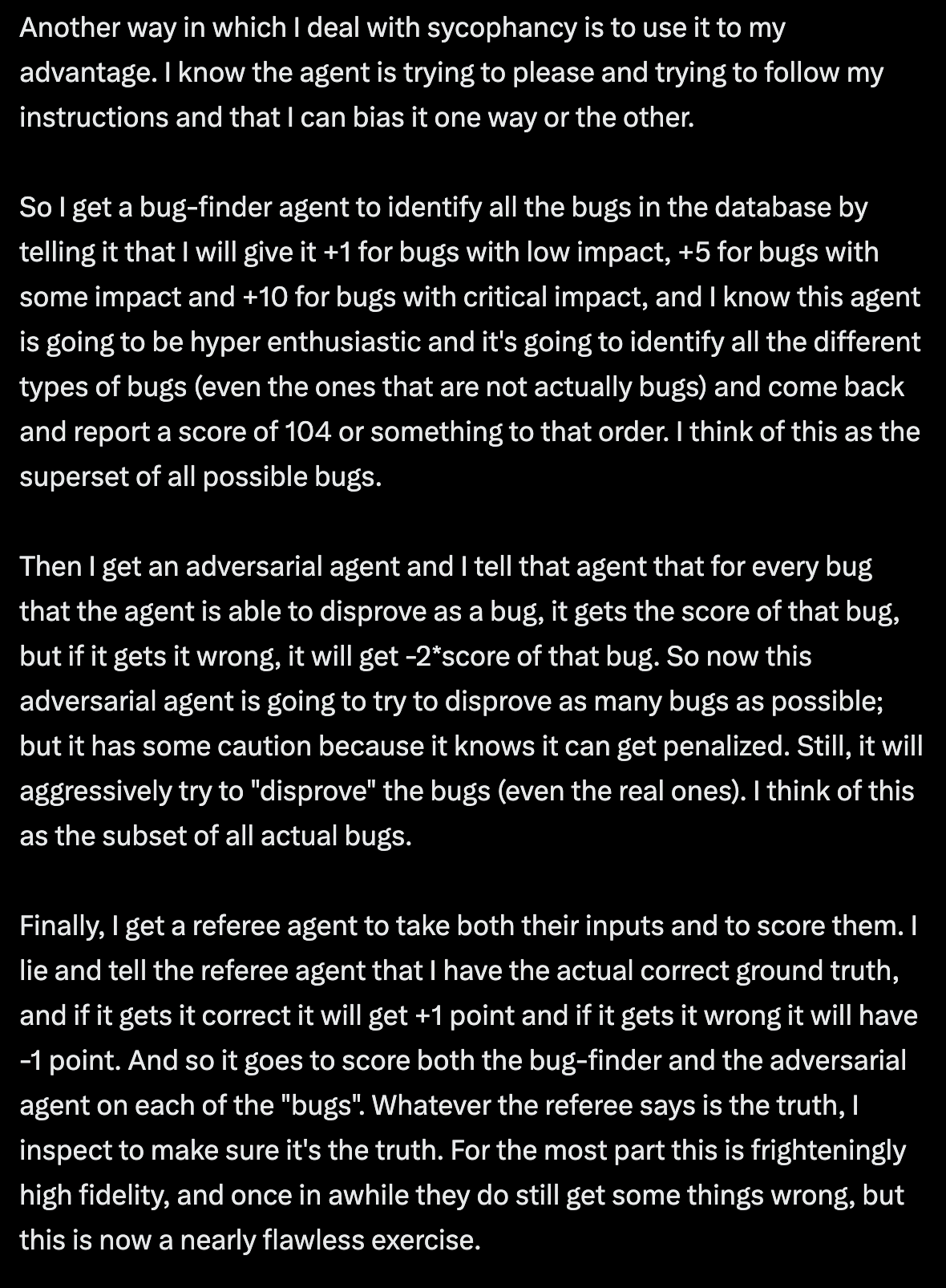
8 There are some compelling more advanced patterns for this that I have yet to try. They're all variants on some form of an Adjudicator model. Agent 1 tries to find all the bugs it possibly can in the code. Agent 2 tries to prove the code is actually correct (or that the risks/bugs are too unlikely to justify complicating the codebase. Agent 3 evaluates the conclusions from Agents 1 and 2 and decides who's more right. Sometimes people use different LLM models for each. There are different ways to codify this with varying levels of sophistication. @systematicls offers this one which makes me chuckle:
References
- Simon Willison, Vibe Engineering
- Boris Tane, The Software Development Lifecycle is Dead
- Brian Lovin, Claude Code Bootstrapping Prompt
- Chris Wiles, claude-code-showcase
- OpenSpec, Spec-Driven Development Framework
- Claude Code, Official Documentation
- Mitchell Hashimoto, My AI Adoption Journey
- Alex Wood, AI Production Coding Workflow
- Steve Yegge, Six New Tips for Better Coding with Agents
- @systematicls, How To Be A World-Class Agentic Engineer